Conversation modes*
Meeting, class, 1:1 and general. Escuta detects the context on its own or you pick it, and it takes the agenda, the project and people's names as context.
 macOS 14 or later · Apple Silicon
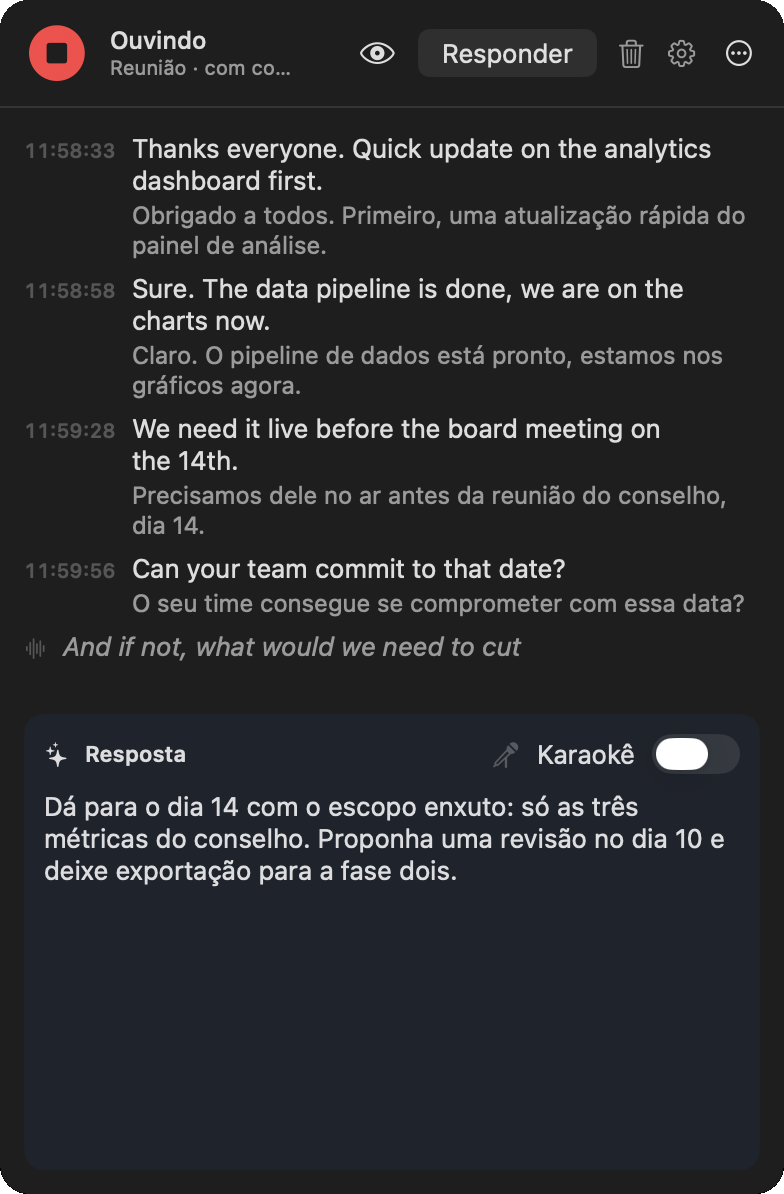
While the other person talks, Escuta suggests what to say, translates and takes notes. For interviews, client meetings and calls in another language.
From US$ 29.90 per month · 7 days free · Real-time translation on your Mac
Works with the AI you already have. Suggestions, summaries, karaoke and the live board use Claude Code with your Claude plan, an API key from another provider, or a free model on your Mac. Transcription, translation and topics run on the Mac itself.
System audio and, if you want, the microphone. Meet, Zoom, Teams, YouTube: everything your Mac hears, split between you and everyone else.
Parakeet, a speech model that runs in CoreML on the chip itself. The line shows up while the person is still talking, with the translation right below it.
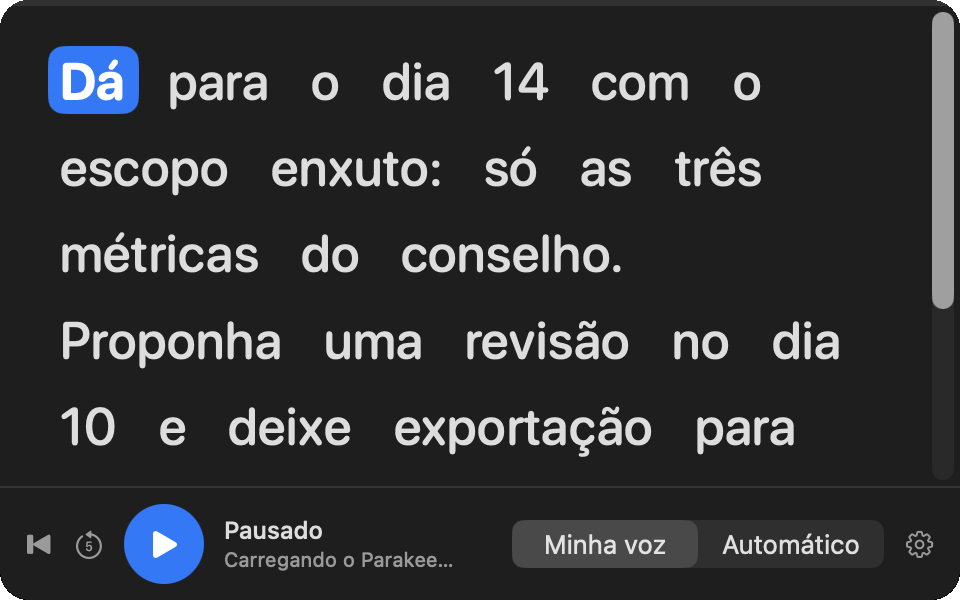
With one shortcut, the conversation becomes a question for Claude. The answer streams in, short and in your tone, and the karaoke follows your voice as you speak.
* Requires an AI: Claude Code with your Claude subscription, another provider with your own key (OpenAI, Gemini and more), or a model on your Mac. Without one, everything that runs on the Mac keeps working.
* Requires an AI: Claude Code with your Claude subscription, another provider with your own key (OpenAI, Gemini and more), or a model on your Mac. Without one, everything that runs on the Mac keeps working.
Escuta has no server and no language model of its own. When you ask for a suggestion, it calls the Claude Code already installed on your Mac, using your subscription. That's why Escuta costs so little, and that's why it can't answer without an AI.
AI options
Use the AI you already have. Pick it in Settings › Answer and switch anytime:
Each has fast, balanced and best models, and you can set a backup: if one fails, the other answers. With an API key, usage is billed by the provider, directly to your account. With Ollama or LM Studio, nothing leaves your Mac.
You need Claude Code installed and a Claude Pro, Max, Team or Enterprise plan, or an API key from another provider. Escuta is not affiliated with Anthropic.
Meeting, class, 1:1 and general. Escuta detects the context on its own or you pick it, and it takes the agenda, the project and people's names as context.
Each sentence is translated while the person is still talking, by the Mac’s own translator: no internet and none of your subscription. A call in English or Spanish stops being a language problem. Needs macOS 26 or later.
When you stop: title, summary, decisions and tasks with owners and due dates, by Claude or on the Mac itself with Apple Intelligence. Transcripts are saved to Documents, and they're yours alone.
Select an area and its text goes into the transcript via OCR. Handy for the slide or document someone is sharing on screen.
A floating panel next to the call, opened and closed with a shortcut, that stays out of the way of Meet, Zoom or Teams.
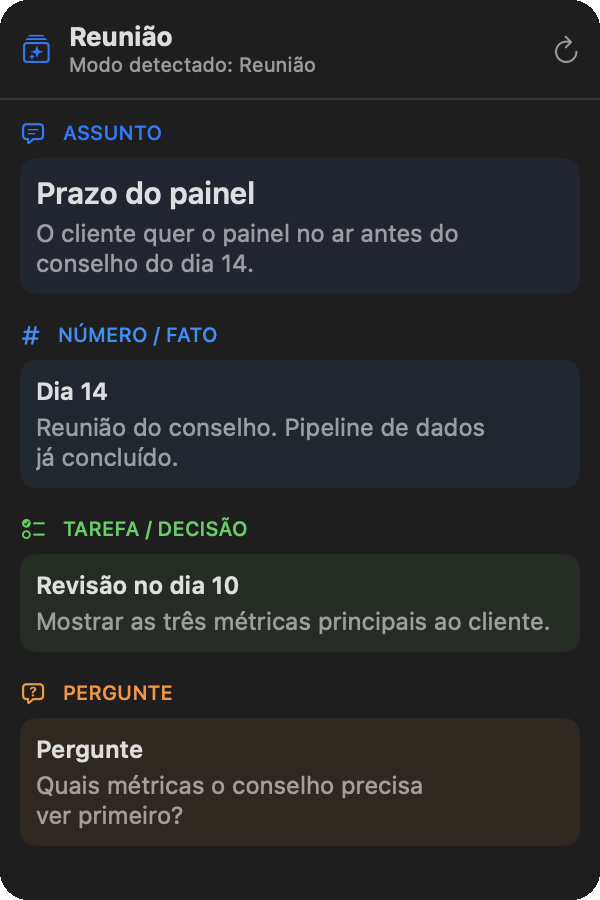
Names, numbers and commitments that come up appear on a live board as the conversation moves on.
* Requires an AI: Claude Code with your Claude subscription, another provider with your own key (OpenAI, Gemini and more), or a model on your Mac. Without one, everything that runs on the Mac keeps working.
Transcription runs in CoreML on the chip itself. With the Claude features*, only the transcript text goes to Claude, through your subscription, or to the provider you choose (with Ollama or LM Studio, nothing leaves your Mac). The live board and auto-answer are on by default and send excerpts while you listen; turn them off in settings if you want nothing to leave your Mac. No server of ours in the middle, no cloud recording, no account.
Otter price as of October 2026, individual plan.
What about Claude Meetings?
Claude Meetings, from Anthropic, joins the call as a participant and works for the group: it builds plans, whiteboards and notes for everyone. Escuta stays on your Mac and is yours alone.
Claude Meetings was announced by Anthropic in November 2026, in beta. Escuta is not affiliated with Anthropic.
* Requires an AI: Claude Code with your Claude subscription, another provider with your own key (OpenAI, Gemini and more), or a model on your Mac. Without one, everything that runs on the Mac keeps working.
Free
7 days · no card
A week of meetings to try it out.
One month
per month · card
For a month of meetings.
Pay once No subscription
once · card
Escuta is yours forever.
Full refund within 14 days, for any reason. Refund policy
Bonus: buying Escuta also gets you TraduzaJa for free. It translates, corrects and rewrites the selected text in any app with a shortcut, using the same Claude Code*.
* Requires an AI: Claude Code with your Claude subscription, another provider with your own key (OpenAI, Gemini and more), or a model on your Mac. Without one, everything that runs on the Mac keeps working.
Prices in US dollars. In Brazil you pay in reais: R$ 29.90 per month or R$ 99.90 once, by Pix or card.
Languages
Transcribes 25 languages, offline, and detects which one is being spoken: English, Portuguese, Spanish, French, German, Italian, Dutch, Polish, Russian, Ukrainian, Swedish, Danish, Finnish, Greek, Hungarian, Czech, Slovak, Slovenian, Croatian, Bulgarian, Romanian, Estonian, Latvian, Lithuanian and Maltese.
On-Mac translation covers English, Portuguese, Spanish, French, German, Italian and the other languages of Apple’s translator; with Claude it goes into any language. The app interface is in English and Portuguese.
Claude subscription required on every plan for suggestions, summaries, karaoke and the live board, sold separately by Anthropic. Transcription and translation work without it.
Requires macOS 14 or later and Apple Silicon.
To transcribe, all you need is the Mac. The AI (Claude or another provider) only comes in for the features marked with *.
To use Escuta
M1 or newer. Parakeet runs on the Neural Engine; it doesn't work on Intel.
The Parakeet speech model ships inside the app. Transcription is 100% offline from your very first meeting; the internet is only used for updates and for the Claude features.
Screen Recording and System Audio to hear the call; Microphone, if you want to separate your voice; Accessibility and Input Monitoring for the shortcuts. The app asks for each one at the right moment.
The links open System Settings right on the correct pane; your browser asks first.
Notes without Claude, conversation topics and asking your meetings use Apple Intelligence: it needs macOS 26, a compatible Mac and Apple Intelligence turned on in System Settings. On-Mac translation needs macOS 26 and the language pair downloaded in System Settings › General › Language & Region › Translation Languages. On macOS 14 and 15, transcription, who said what, import and export work the same; notes and translation use Claude instead.
The on-Mac model reads little text at a time: its notes are good, Claude's are more complete. Transcription covers 25 European languages; Japanese, Chinese, Korean and Arabic not yet.
Only for the AI features*
Suggestions, summaries, the insights board and karaoke. Without this, Escuta transcribes, translates and saves as usual.
It's Anthropic's command-line program. Install it with the command below, run claude once to sign in with your account, and Escuta finds it on its own.
curl -fsSL https://claude.ai/install.sh | bashPro, Max, Team or Enterprise, purchased directly from Anthropic. That's what pays for the suggestions, not Escuta.
Nothing else: no Node, Python, Homebrew or Escuta account. OCR comes with macOS.
The audio, never: transcription runs in CoreML on the chip itself. The transcript text goes to Claude, through your account (or to the AI provider you choose), when you use the AI features: suggestions, summaries, karaoke and the live board. On-Mac translation and topics never leave the Mac. The live board and auto-answer are on by default and send excerpts of the conversation while you listen. For nothing to leave your Mac, turn both off in settings and don't use the AI features, or use a model on your Mac.
By card in US dollars, through Stripe's secure checkout (in Brazil, in reais by Pix or card). As soon as the payment is confirmed, you get the app and your license key by email within a few minutes. Customers in Brazil also get the invoice (NFS-e) within 3 business days, for the CPF or CNPJ given at checkout.
For Escuta, you pay monthly (US$ 29.90, no auto-renewal) or once (US$ 99.90, yours forever). On top of that, for suggestions and summaries, Escuta uses the Claude Code installed on your Mac, which requires a Claude subscription (Pro or higher), sold separately by Anthropic. You can also use an API key from another provider (OpenAI, Gemini and more, billed by them) or a free model on your Mac. With no AI at all, Escuta transcribes and saves, but it doesn't answer.
Yes, we recommend it. Escuta transcribes the call audio, and the most transparent thing is to say at the start that you're taking notes with an assistant. In many companies and countries this is mandatory.
It transcribes English, Portuguese, Spanish and 22 more European languages. Real-time translation runs on the Mac itself (macOS 26 or later).
Screen Recording and System Audio, Microphone (optional), Accessibility and Input Monitoring for the shortcuts. All of them can be revoked in System Settings.
You get a key by email when you buy and paste it into the app's settings. The monthly plan covers 1 Mac for 30 days; paying once covers up to 3 Macs, forever. To move to another Mac, use "Remove from this Mac" in Settings › License and activate on the other one. To keep going after the 30 days of the monthly plan, just buy again, or pay once and stop thinking about it.
Everything that runs on the Mac stays free, forever: transcription, translation, who said what, notes by Apple Intelligence, history, export, audio, asking your meetings and MCP. Only the Claude features stop: answer suggestions, screen reading with answers, the live board, summary and karaoke.
Try it free for 7 days first, no card needed. After buying, you can ask for a full refund within 14 days, for any reason. See the refund policy.